mirror of
https://github.com/OliveTin/OliveTin
synced 2025-12-12 00:55:34 +00:00

OliveTin

OliveTin is a web interface for running Linux shell commands.


Some example use cases;
- Give controlled access to run shell commands to less technical folks who cannot be trusted with SSH. I use this so my family can
podman restart plexwithout asking me, and without giving them shell access! - Great for home automation tablets stuck on walls around your house - I use this to turn Hue lights on and off for example.
- Sometimes SSH access isn't possible to a server, or you are feeling too lazy to type a long command you run regularly! I use this to send Wake on Lan commands to servers around my house.
Join the community on Discord.
YouTube video demo (6 mins)
Features
- Responsive, touch-friendly UI - great for tablets and mobile
- Super simple config in YAML - because if it's not YAML now-a-days, it's not "cloud native" :-)
- Dark mode - for those of you that roll that way.
- Accessible - passes all the accessibility checks in Firefox, and issues with accessibility are taken seriously.
- Container - available for quickly testing and getting it up and running, great for the selfhosted community.
- Integrate with anything - OliveTin just runs Linux shell commands, so theoretially you could integrate with a bunch of stuff just by using curl, ping, etc. However, writing your own shell scripts is a great way to extend OliveTin.
- Lightweight on resources - uses only a few MB of RAM and barely any CPU. Written in Go, with a web interface written as a modern, responsive, Single Page App that uses the REST/gRPC API.
- Good amount of unit tests and style checks - helps potential contributors be consistent, and helps with maintainability.
Screenshots
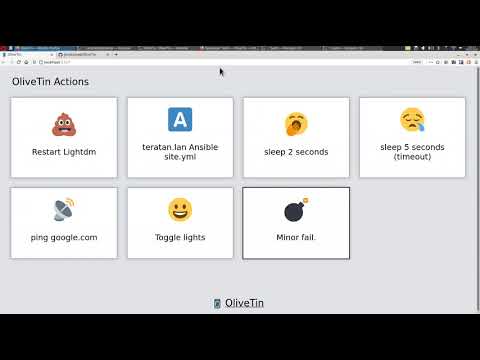
Desktop web browser;

Desktop web browser (dark mode);

Mobile screen size (responsive layout);

Documentation
All documentation can be found at http://docs.olivetin.app . This includes installation and usage guide, etc.
Quickstart reference for config.yaml
This is a quick example of config.yaml - but again, lots of documentation for how to write your config.yaml can be found at the documentation site.
Put this config.yaml in /etc/OliveTin/ if you're running a standard service, or mount it at /config if running in a container.
# Listen on all addresses available, port 1337
listenAddressSingleHTTPFrontend: 0.0.0.0:1337

# Choose from INFO (default), WARN and DEBUG
logLevel: "INFO"

# Actions (buttons) to show up on the WebUI:
actions:
  # Docs: https://docs.olivetin.app/action-container-control.html
- title: Restart Plex
  icon: smile
  shell: docker restart plex

  # This will send 1 ping
  # Docs: https://docs.olivetin.app/action-ping.html
- title: Ping Google.com
  shell: ping google.com -c 1

  # Restart lightdm on host "overseer"
  # Docs: https://docs.olivetin.app/action-ssh.html
- title: restart lightdm
  icon: poop
  shell: ssh root@overseer 'service lightdm restart'
A full example config can be found at in this repository - config.yaml.