 safishamsiandClaude Opus 4.8
fe085ceddd
safishamsiandClaude Opus 4.8
fe085ceddd
Re-translate every localized README to match the reorganized English
(demo and benchmarks above the docs hub, number-bearing headings,
tightened install, trimmed per-platform/project-config sections, the
one-install line). Headers and the language switcher are preserved
verbatim; code blocks, URLs, badges, brand names, and figures are kept
byte-identical; repo-relative links use the docs/translations/ relative
convention; no emojis, no em dashes.

Co-Authored-By: Claude Opus 4.8 <noreply@anthropic.com>

Read this in other languages
English | 简体中文 | 日本語 | 한국어 | Deutsch | Français | Español | हिन्दी | Português | Русский | العربية | فارسی | Italiano | Polski | Nederlands | Türkçe | Українська | Tiếng Việt | Bahasa Indonesia | Svenska | Ελληνικά | Română | Čeština | Suomi | Dansk | Norsk | Magyar | ภาษาไทย | Oʻzbekcha | 繁體中文 | Filipino | עברית










將代理的 token 開銷減少 80%。 Graphify Cloud 是一個常駐的記憶層,它治理你的代理,維持程式碼品質,並透過形式化驗證來證明正確性。開始 14 天免費試用 →
在你的 AI 編碼助理中輸入 /graphify,它就會把你的整個專案(程式碼、文件、PDF、圖片、影片)映射成一張知識圖譜,你可以用查詢取代在檔案裡 grep。
- 程式碼映射免費,完全本地。 程式碼以 tree-sitter AST 解析:具確定性,無需 LLM,沒有任何內容離開你的機器。(文件、PDF、圖片和影片會使用你助理的模型,或一個已設定的 API key,做一次語意處理。)
- 每一條邊都有說明。 每個連接都會標註
EXTRACTED(在原始碼中明確存在)或INFERRED(由 graphify 推斷),這樣你就能分辨哪些是直接讀到的,哪些是推斷出來的。 - 不是向量索引。 沒有嵌入,沒有向量庫:是一張你可以真正走訪的圖。問一個問題,追蹤兩個事物之間的路徑,或是解釋某一個概念。
Note
想讓它一直在線? Graphify Cloud 讓圖譜在你的整個 SDLC 中保持即時:支援 monorepo 和跨儲存庫、形式化驗證,以及帶有 SDLC 全域視角的程式碼審查,還有 Sentry、Jira 等連接器,讓事故和工單與程式碼處於同一張圖中。在 app.graphify.com 開始 14 天免費試用。
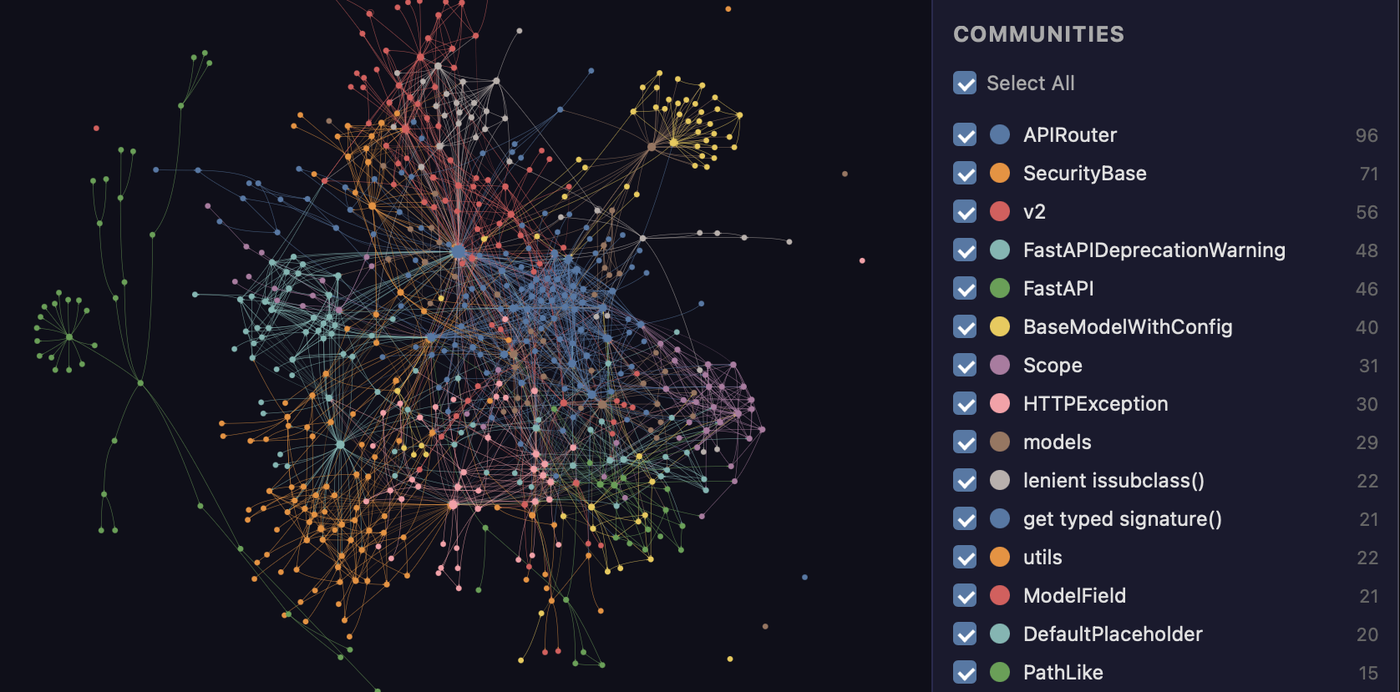
由 graphify 映射的 FastAPI 程式碼庫。每個節點是一個概念,顏色代表偵測到的社群,整張圖在 graph.html 中都可點擊。
開始使用(30 seconds)。需要 Python 3.10+ 和 uv(或 pipx):
uv tool install graphifyy      # install the CLI (or: pipx install graphifyy)
graphify install               # detects your assistant and registers the skill
然後,在你的 AI 助理中:
/graphify .
就這樣。你會得到三個檔案:
graphify-out/
├── graph.html       open in any browser: click nodes, filter, search
├── GRAPH_REPORT.md  the highlights: key concepts, surprising connections, suggested questions
└── graph.json       the full graph: query it anytime without re-reading your files
持久化的圖譜包含 graph.schema_version,讓整合方可以偵測到不相容的格式變更,另外還有 graph.graphify_version 標識產生該圖譜的 Graphify 版本。
一次安裝,適用任何助理、任何作業系統。 Claude Code、Cursor、Codex、Gemini CLI、GitHub Copilot 以及 20+ 個其他助理,可在 macOS、Linux 和 Windows 上執行:選擇你的平台。
實際演示

圖譜建好之後,你就用查詢取代讀檔案。真實輸出,graphify 在上面展示的 FastAPI 程式碼庫上執行:
$ graphify explain "APIRouter"
Node: APIRouter
  Source:    routing.py L2210
  Community: 2
  Degree:    47

Connections (47):
  --> RequestValidationError [uses] [INFERRED]
  --> Dependant [uses] [INFERRED]
  --> .get() [method] [EXTRACTED]
  <-- __init__.py [imports] [EXTRACTED]
  ...

$ graphify path "FastAPI" "ModelField"
Shortest path (3 hops):
  FastAPI --uses--> DefaultPlaceholder <--references-- get_request_handler() --references--> ModelField
每一條邊都帶有一個信心標籤(EXTRACTED = 在原始碼中明確存在,INFERRED = 由解析推導得出),這樣你就能分辨哪些是直接讀到的,哪些是推斷出來的。graphify query "<question>" 會針對一個自然語言問題回傳一個有範圍的子圖,graphify path A B 則追蹤任意兩個事物如何連接。
它能做什麼
開箱即用你能得到的:
| 能力 | 你能得到什麼 |
|---|---|
| God nodes | 連接最多的概念,讓你看清一切都流經哪裡 |
| Communities | 把圖譜拆分為子系統(Leiden),帶有無需 LLM 的標籤 |
| Cross-file links | calls / imports / inherits / mixes_in 透過 tree-sitter AST 在 ~40 languages 之間解析 |
| Query, path, explain | 問一個問題,追蹤兩個事物之間的路徑,或解釋某一個概念,全部針對 graph.json 進行 |
| Rationale + doc refs | # NOTE: / # WHY: 註解以及 ADR/RFC 引用成為與程式碼相連的一級節點 |
| Beyond code | 文件、PDF、圖片和影片/音訊全部映射進同一張圖 |
| Local-first | 程式碼以 tree-sitter 在本地解析(無 LLM,沒有任何內容離開你的機器);只有對文件/媒體的語意處理才會呼叫後端,而且只在你設定了後端時才會 |
Tip
要在很多儲存庫或一個 monorepo 上執行?Graphify Cloud 會持續地做這件事,並將代理的 token 開銷減少 80%,帶有跨儲存庫連接、SDLC 全域的程式碼審查、形式化驗證,以及 Sentry/Jira 連接器。開始 14 天免費試用 →
基準測試:0.497 recall@10,0 LLM credits
| 基準 | 指標 | graphify | 同類 |
|---|---|---|---|
| LOCOMO (n=300) | recall@10 | 0.497 | mem0 0.048, supermemory 0.149 |
| LOCOMO (n=300) | QA accuracy | 45.3% | supermemory 49.7%, mem0 27.3% |
| LongMemEval-S (n=50) | QA accuracy | 76% | tied with dense RAG |
| ERPNext cross-tool (n=6) | key-fact coverage | 82.0% | grep/read baseline 70.8% |
| Graph build | LLM credits | 0 | per-token for most systems |
每個系統都在同一套測試框架、同一個模型和同樣的預算下執行,由一位評審者評分,並經過與第二位評審者的盲驗證(90.6% agreement, Cohen's kappa 0.81)。完整的每系統表格、程式碼智慧結果以及重現命令:BENCHMARKS.md。
文件
完整的指南與參考見 docs.graphify.com:
- Quickstart:建立你的第一張圖
- CLI reference:每個命令和旗標
- Ask better graph questions:查詢模式
- Configuration:環境變數和調校
- Supported inputs:語言和檔案類型
- Team workflows 和 PR review
- Troubleshooting 和 How it works
前置需求
| 需求 | 最低 | 檢查 | 安裝 |
|---|---|---|---|
| Python | 3.10+ | python --version |
python.org |
| uv (recommended) | any | uv --version |
curl -LsSf https://astral.sh/uv/install.sh | sh |
| pipx (alternative) | any | pipx --version |
pip install pipx |
macOS 快速安裝(Homebrew):
brew install python@3.12 uv
Windows 快速安裝:
winget install astral-sh.uv
Ubuntu/Debian:
sudo apt install python3.12 python3-pip pipx
# or install uv:
curl -LsSf https://astral.sh/uv/install.sh | sh
Install
Important
官方套件: PyPI 套件名稱是
graphifyy(兩個 y)。PyPI 上其他graphify*套件與本專案無關。CLI 命令仍然是graphify。
官方原始碼儲存庫是 Graphify-Labs/graphify。
兩條命令的快速上手在本 README 頂部。本節介紹安裝方法、專案範圍內的安裝,以及每個受支援的平台。
安裝方法(擇一):
uv tool install graphifyy   # recommended, isolated env (if 'graphify' isn't found after, run: uv tool update-shell)
pipx install graphifyy      # alternative
pip install graphifyy       # may need PATH setup, see Troubleshooting below
然後執行一次 graphify install。它會偵測你執行的是哪個助理並註冊該技能,因此無需針對每個助理分別設定。打開你的 AI 助理並輸入 /graphify .
要把助理技能安裝到目前的儲存庫而不是你的使用者設定中,加上 --project:
graphify install --project
graphify install --project --platform codex
專案範圍的安裝會寫入目前目錄下,例如 .claude/skills/graphify/SKILL.md 或 .agents/skills/graphify/SKILL.md(外加一個技能按需載入的 references/ 附屬目錄),並為可以提交的檔案印出一條 git add 提示。支援專案範圍安裝的各平台命令接受同樣的旗標,例如 graphify claude install --project 或 graphify codex install --project。
Tip
遇到
command not found、Mac/Windows 上的pip問題、PowerShell 引號問題、uvx用法、git 掛鉤的 PATH 問題,或嚴格模式?見 Installation 和 Troubleshooting。
Pick your platform (20+ assistants, click to expand)
| Platform | Install command |
|---|---|
| Claude Code (Linux/Mac) | graphify install |
| Claude Code (Windows) | graphify install (auto-detected) or graphify install --platform windows |
| CodeBuddy | graphify install --platform codebuddy |
| Codex | graphify install --platform codex |
| OpenCode | graphify install --platform opencode |
| Kilo Code | graphify install --platform kilo |
| GitHub Copilot CLI | graphify install --platform copilot |
| VS Code Copilot Chat | graphify vscode install |
| Aider | graphify install --platform aider |
| OpenClaw | graphify install --platform claw |
| Factory Droid | graphify install --platform droid |
| Trae | graphify install --platform trae |
| Trae CN | graphify install --platform trae-cn |
| Gemini CLI | graphify install --platform gemini |
| Hermes | graphify install --platform hermes |
| Kimi Code | graphify install --platform kimi |
| Amp | graphify amp install |
| Agent Skills (cross-framework) | graphify install --platform agents (alias --platform skills) |
| Kiro IDE/CLI | graphify kiro install |
| Pi coding agent | graphify install --platform pi, plus graphify pi guard install for the native guard |
| Cursor | graphify cursor install |
| Devin CLI | graphify devin install |
| Google Antigravity | graphify antigravity install |
Codex 使用者還需要在 ~/.codex/config.toml 的 [features] 下設定 multi_agent = true 以進行平行提取。CodeBuddy 使用與 Claude Code 相同的 Agent 工具和 PreToolUse 掛鉤機制。Factory Droid 使用 Task 工具來平行派發子代理。OpenClaw 和 Aider 使用循序提取(這些平台上的平行代理支援仍處於早期階段)。Trae 使用 Agent 工具來平行派發子代理,並且不支援 PreToolUse 掛鉤,所以 AGENTS.md 是其常駐機制。
--platform agents(別名 --platform skills)針對通用的跨框架 Agent-Skills 位置:規範定義的使用者全域目錄 ~/.agents/skills/(由 npx skills 和符合規範的框架讀取)用於全域安裝,而 ./.agents/skills/ 用於專案(--project)安裝。裸的 graphify install 按設計仍然是單平台(Claude Code):當你希望該技能能被任何讀取 .agents/skills 的框架發現時,使用具名的 agents 平台。
Pi 沒有 PreToolUse 掛鉤,因此 graphify pi guard install 會註冊一個原生 Pi 擴充(透過 Pi 自己的 pi install <package directory>),它會在 Pi 的 read、grep、find 和搜尋類 bash 呼叫之前執行已安裝的 graphify hook-guard。圖譜新鮮/陳舊的判斷以及 GRAPHIFY_HOOK_STRICT=1 的每工作階段一次的已索引讀取拒絕都來自同一套策略,因此 Pi 與 Claude Code 的掛鉤行為一致;指引以 <system-reminder source="graphify"> 導引訊息的形式到達。它需要 Pi 0.58.4 或更新版本:更早的版本會讓一條導引訊息跳過平行工具呼叫批次的其餘部分。該套件隨 Graphify 安裝一起發布,所以請持久化安裝 Graphify(uv tool install graphifyy 或 pipx install graphifyy,而不是 uvx),在安裝或升級後重新啟動 Pi,並用 graphify pi guard uninstall 移除它。只有本地檔案目標會被檢查;該掛鉤需要 graphify 位於專案之外的一個絕對 PATH 條目上,受限於兩秒、256 KiB 輸入/64 KiB 輸出的呼叫,並且在出錯時放行。同一個套件也會在 Oh My Pi 中載入:omp plugin install "$(graphify pi guard path)"。註冊的路徑包含 Python 版本和 venv,所以在更改任一者之後請重新執行 graphify pi guard install,並用 pi remove <old path> 移除舊條目。
Codex 使用
$graphify而不是/graphify。
Optional extras (install only what you need)
| Extra | What it adds | Install |
|---|---|---|
pdf |
PDF extraction | uv tool install "graphifyy[pdf]" |
office |
.docx and .xlsx support |
uv tool install "graphifyy[office]" |
google |
Google Sheets rendering | uv tool install "graphifyy[google]" |
video |
Video/audio transcription (faster-whisper + yt-dlp) | uv tool install "graphifyy[video]" |
mcp |
MCP stdio server | uv tool install "graphifyy[mcp]" |
neo4j |
Neo4j push support | uv tool install "graphifyy[neo4j]" |
falkordb |
FalkorDB push support | uv tool install "graphifyy[falkordb]" |
svg |
SVG graph export | uv tool install "graphifyy[svg]" |
leiden |
Leiden community detection (graspologic on Python < 3.13; native backend on 3.13+) | uv tool install "graphifyy[leiden]" |
ollama |
Ollama local inference | uv tool install "graphifyy[ollama]" |
openai |
OpenAI / OpenAI-compatible APIs | uv tool install "graphifyy[openai]" |
gemini |
Google Gemini API | uv tool install "graphifyy[gemini]" |
anthropic |
Anthropic Claude API (--backend claude, uses ANTHROPIC_API_KEY) |
uv tool install "graphifyy[anthropic]" |
bedrock |
AWS Bedrock (uses IAM, no API key) | uv tool install "graphifyy[bedrock]" |
azure |
Azure OpenAI Service (--backend azure, uses AZURE_OPENAI_API_KEY + AZURE_OPENAI_ENDPOINT) |
uv tool install "graphifyy[openai]" |
sql |
SQL schema extraction | uv tool install "graphifyy[sql]" |
postgres |
Live PostgreSQL introspection (--postgres DSN) |
uv tool install "graphifyy[postgres]" |
dm |
BYOND DreamMaker .dm/.dme AST extraction (may need a C compiler + python3-dev if no wheel matches your platform) |
uv tool install "graphifyy[dm]" |
terraform |
Terraform / HCL .tf/.tfvars/.hcl AST extraction |
uv tool install "graphifyy[terraform]" |
pascal |
Pascal / Delphi .pas/.dpr/.dpk/.inc AST extraction (more accurate calls/inherits edges; falls back to a regex extractor when absent) |
uv tool install "graphifyy[pascal]" |
ocaml |
OCaml .ml/.mli AST extraction |
uv tool install "graphifyy[ocaml]" |
commonlisp |
Common Lisp .lisp/.cl/.lsp/.asd AST extraction |
uv tool install "graphifyy[commonlisp]" |
robot |
Robot Framework .robot/.resource extraction (suites, test cases, keywords, keyword-call and resource/library import edges) |
uv tool install "graphifyy[robot]" |
chinese |
Chinese query segmentation (jieba) | uv tool install "graphifyy[chinese]" |
all |
Everything above | uv tool install "graphifyy[all]" |
讓你的助理始終使用圖譜
在建立完圖譜之後,在你的專案裡執行一次:
在你的專案裡執行一次 graphify <platform> install,例如 graphify claude install 或 graphify codex install(或 graphify install --platform <name>)。
這會寫入一個小的設定檔,告訴你的助理在遇到程式碼庫問題時去查詢知識圖譜,優先使用像 graphify query "<question>" 這樣有範圍的查詢,而不是讀取完整報告或 grep 原始檔案。
- 掛鉤平台(Claude Code、Gemini CLI):掛鉤會在搜尋類工具呼叫之前(並且在 Claude Code 上,在透過 Read/Glob 工具逐個讀取原始檔案之前)自動觸發,把你的助理引向圖譜路徑。
- 指令檔平台(Codex、OpenCode、Cursor 等):持久的指令檔(
AGENTS.md、.cursor/rules/等)提供同樣的查詢優先指引。
GRAPH_REPORT.md 仍然可用於廣泛的架構審查。
每個平台具體寫入哪些檔案(CodeBuddy 的 CODEBUDDY.md + PreToolUse 掛鉤、Codex 的 AGENTS.md、Kilo 的原生 .kilo 外掛、Cursor 的 alwaysApply 規則等等)在 Always-on setup 中有介紹。
要一次性從所有平台移除 graphify:graphify uninstall(加 --purge 還會刪除 graphify-out/)。或者使用各平台的命令(例如 graphify claude uninstall)。
用 CLI 技能還是 MCP 指示?
graphify install 安裝的指令,和隨 Graphify MCP 連接一起提供的指令,描述的是查詢圖譜的不同方式:
| 設定 | 使用哪套指引 | 查詢存取 |
|---|---|---|
| 本地 CLI 和已安裝的助理技能 | 由 graphify install 寫入的平台指令 |
針對本地圖譜(預設 graphify-out/)執行 graphify query、graphify path 和 graphify explain。 |
| 已連接的 Graphify MCP 伺服器 | 該連接的指令以及該伺服器列出的工具 | 針對該連接所服務的圖譜呼叫所列的 MCP 工具。工具名稱和描述來自伺服器。 |
兩者都鼓勵在廣泛的原始碼搜尋之前先進行有範圍的圖譜查詢。選擇與你助理實際能存取的工具相符的那套指令;兩個程式碼區塊都沒有為你助理的指令檔確立一條普遍的優先規則。如果你同時使用兩種整合,弄清每種查詢的是哪張圖,並選擇一條主要的查詢路徑,而不是把兩個無條件的指令區塊都複製進 AGENTS.md。
graphify install 安裝的是本地助理整合;它不會建立 MCP 連接。一個 MCP 用戶端不需要執行本地 CLI 查詢才能使用其連接的伺服器。一個本地託管的伺服器仍然需要它自己的 Graphify 安裝和圖譜,而一個託管連接可能服務的是一張不在用戶端工作目錄中的圖譜。如果預期的工具缺失,請檢查相關的 CLI 安裝或 MCP 連接,而不是把另一種設定的指令當作可以互換的。
報告裡有什麼
GRAPH_REPORT.md 彙總了 god 節點、社群和關鍵路徑,供廣泛的架構審查。圖譜是如何建立的以及它包含什麼:How graphify works。
它能處理哪些檔案:~40 languages
graphify 以 tree-sitter AST 在本地解析 ~40 programming languages,並透過一次可選的語意處理映射文件、PDF、圖片和音訊/影片。完整列表:Supported inputs。
常用指令
/graphify .                        # build graph for current folder
/graphify ./docs --update          # re-extract only changed files
/graphify . --cluster-only         # rerun clustering without re-extracting
/graphify . --cluster-only --resolution 1.5      # more granular communities
/graphify . --cluster-only --exclude-hubs 99     # suppress utility super-hubs from god-node rankings
/graphify . --no-viz               # skip the HTML, just the report + JSON
/graphify . --wiki                 # build a markdown wiki from the graph
graphify export callflow-html      # Mermaid architecture/call-flow HTML (auto-regenerates on every git commit if hook is installed)

/graphify query "what connects auth to the database?"
/graphify path "UserService" "DatabasePool"
/graphify explain "RateLimiter"

/graphify add https://arxiv.org/abs/1706.03762   # fetch a paper and add it
/graphify add <youtube-url>                       # transcribe and add a video

graphify hook install              # auto-rebuild on commit + branch checkout (run `graphify update .` after `git pull`: see "Recommended workflow" below)
graphify merge-graphs a.json b.json              # combine two graphs

graphify prs                       # PR dashboard: CI state, review status, worktree mapping
graphify prs 42                    # deep dive on PR #42 with graph impact
graphify prs --triage              # AI ranks your review queue (uses whatever backend is configured)
graphify prs --conflicts           # PRs sharing graph communities: merge-order risk
見下方的完整命令參考。
忽略檔案
graphify 遵守 .gitignore,並支援 --exclude 模式和專案級的 .graphifyignore。詳情:Configuration。
專案設定
在掃描根目錄建立一個 .graphifyrc,用於存放屬於專案而不是某一次執行的設定。每行一個 key=value;以 # 開頭的行是註解。
有歧義的副檔名。 有些副檔名在不同專案裡代表不同的語言:.inc 在 pfSense 上是 PHP,在 Delphi 工程裡是 Pascal,在別處是 SQL 或組合語言;.h 是 C 或 C++;.m 是 Objective-C 或 MATLAB。graphify 必須選一個全域預設值,而當它選錯時,檔案並不會失敗:它會按錯誤的語言解析,產出少量無關緊要的節點,於是圖譜看起來是有內容的,而真正的符號卻缺失了。請宣告該副檔名在你的儲存庫裡是什麼:
# .graphifyrc
# A language name:
language.inc=php
# Or an extension graphify already knows:
language.tpl=.ts
# Baked into the git hooks (see Team setup):
viz_node_limit=0
該宣告會貫穿分類、提取器選擇、語法和解析、匯入、graphify watch 以及 AST 快取(一個在不同語言下重新解析的檔案永遠不會重用舊條目),並且同一個 .graphifyrc 會被 extract、update、掛鉤、MCP 伺服器以及 /graphify 技能讀取。輸入錯誤會在 stderr 上報告一次,然後掃描會用預設值繼續。宣告如何與快取、增量重建和匯入解析互動:Configuration。
團隊設定
提交或分享圖譜,讓你的整個團隊查詢相同的脈絡,並用圖譜脈絡審查拉取請求。見 Share context with your team 和 Review pull requests。
直接使用圖譜
除了你的 AI 助理,你還可以用 graphify query、graphify path 和 graphify explain 直接從 CLI 查詢 graph.json。一個符合多個節點的名稱會被拒絕,並列出候選項,而不是去猜。指令稿可以從結束代碼讀取結果:0 是有答案,3 是名稱有歧義,4 是沒有符合的節點。見 Ask better graph questions 和 query reference。
環境變數
後端、API key、掛鉤行為和調校都由環境變數控制。完整表格:Configuration。
隱私
- 程式碼檔案:透過 tree-sitter 在本地處理。沒有任何內容離開你的機器。一個純程式碼語料庫不需要 API key:
graphify extract完全離線執行。在混合儲存庫上,加--code-only只索引程式碼,跳過那些本來需要 LLM 的文件/PDF/圖片。 - 影片/音訊:以 faster-whisper 在本地轉錄。沒有任何內容離開你的機器。
- 文件、PDF、圖片:傳送給你的 AI 助理做語意提取(透過
/graphify技能,使用你 IDE 工作階段執行的任何模型)。無頭的graphify extract需要GEMINI_API_KEY/GOOGLE_API_KEY(Gemini)、MOONSHOT_API_KEY(Kimi)、ANTHROPIC_API_KEY(Claude)、OPENAI_API_KEY(OpenAI)、DEEPSEEK_API_KEY(DeepSeek)、一個執行中的 Ollama 實例(OLLAMA_BASE_URL)、透過標準提供者鏈的 AWS 憑證(Bedrock, 無需 API key,使用 IAM),或claudeCLI 二進位檔(Claude Code, 無需 API key,使用你的 Claude 訂閱)。--dedup-llm旗標使用同一個 key。 - 資料駐留:
graphify extract會根據設定了哪個 API key 自動偵測使用哪個提供者(優先順序:Gemini → Kimi → Claude → OpenAI → DeepSeek → Azure → Bedrock → Ollama)。對於有資料駐留要求的程式碼,使用--backend ollama(完全本地)或傳入一個明確的--backend旗標。Kimi(MOONSHOT_API_KEY)會路由到位於中國的 Moonshot AI 伺服器。 - 無遙測,無使用情況追蹤,無分析。
- 查詢記錄:每一次
graphify query、graphify path、graphify explain以及 MCPquery_graph呼叫都會以 JSON Lines 格式記錄到~/.cache/graphify-queries.log(時間戳、問題、語料庫、回傳的節點、耗時)。完整的子圖回應預設不儲存。設定GRAPHIFY_QUERY_LOG_DISABLE=1以退出,或設定GRAPHIFY_QUERY_LOG=/dev/null以在不停用程式碼路徑的情況下靜默。
疑難排解
常見的安裝和提取問題及其修復:Troubleshooting。
完整指令參考
每個命令和旗標,附範例:CLI reference。
了解更多
- docs.graphify.com:完整文件:指南、命令參考和整合
- How it works:提取流水線、社群偵測、信心評分、基準
- ARCHITECTURE.md:模組拆解,如何新增一門語言
- Optional integrations:Docker MCP Toolkit + SQLite
- The Memory Layer:講述 graphify 背後理念的書,從頭到尾的架構
Graphify Cloud
Graphify Cloud 是建立在 graphify 之上的常駐層。它不是一張你按資料夾按需重建的圖,而是在你的整個軟體開發生命週期中保持一張即時圖:
- token 減少 80%:常駐的記憶層意味著你的代理不必每次工作階段都重新閱讀和重新解釋程式碼庫。
- monorepo 和跨儲存庫:一張貫穿每個服務和儲存庫的連通圖,而不是每個資料夾一張圖。
- 形式化驗證:針對即時圖檢查架構和相依性的不變量。
- 帶有 SDLC 全域視角的程式碼審查:在合併之前看清一次變更如何波及整個系統。
- SDLC 連接器:接入 Sentry、Jira 等,讓事故、工單和程式碼處於同一張圖中。
- 常駐:在背景持續更新,涵蓋程式碼、文件和會議。
在 app.graphify.com 開始 14 天免費試用 →
貢獻
歡迎貢獻。見 CONTRIBUTING.md 了解開發環境建置、測試與 CI 對齊的命令、git 工作流程,以及什麼樣的貢獻才算扎實(可執行的範例和提取 bug 報告最有用)。架構和如何新增一門語言:ARCHITECTURE.md。
新來的?在 Discord 或 GitHub Discussions 打個招呼。
貢獻者
Made with contrib.rocks.
翻譯
本 README 提供 32 種語言版本。使用本檔案頂部的語言切換器閱讀你的語言版本,或瀏覽 docs/translations/。要改進某個翻譯或新增一個,請針對那裡對應的檔案提交一個拉取請求。
基於 graphify 構建
在 graphify 生態裡建立東西?這是受鼓勵的。如果你的專案在名稱裡使用了 "graphify"(例如 graphify-dashboard 或 graphify-action),請在你的 README 裡加一條簡短說明,澄清它是社群建立的,並非隸屬於 Graphify Labs 或由其背書。"graphify" 和 graphify 標誌是 Graphify Labs 的標誌;請不要以暗示官方身分的方式使用它們。
社群與連結



