 Eric Dubé
0864b9ece1
Eric Dubé
0864b9ece1
* dev(apps): add configuration to not use app icon subdomain

For some local configurations of Puter, such as using ngrok or a hosting
service that has limited subdomains or limited subdomain depth, the
static hosting subdomain for app icons is difficult to configure and may
not be viable. Since this is only done so an external geo-replicated
cache can be used, and it's always possible for Puter's backend to
generate an app icon, it should be possible to configure Puter's backend
to use icons from a URL hosted on the default subdomain.

Add a configuration parameter to the service "app-icon" called
"no_subdomain" which prevents Puter's backend from sending puter-icons
subdomain URLs or redirecting to them.

Also perform some small cleanup changes to make the existing code easier
to understand, including:
- rename `buildAppIconUrl` to `buildAppIconSubdomainUrl` to make it
  clear which of the two types of icon URLs are being generated.
- replace `withAppIconUrl` with `get_app_icon_url` so it is possible to
  get an icon URL without mutating an app object.
- make the `get_taskbar_items` helper use the same code for getting app
  icons as the `get_apps` helper.

* fix(apps): test initializes a service with no config
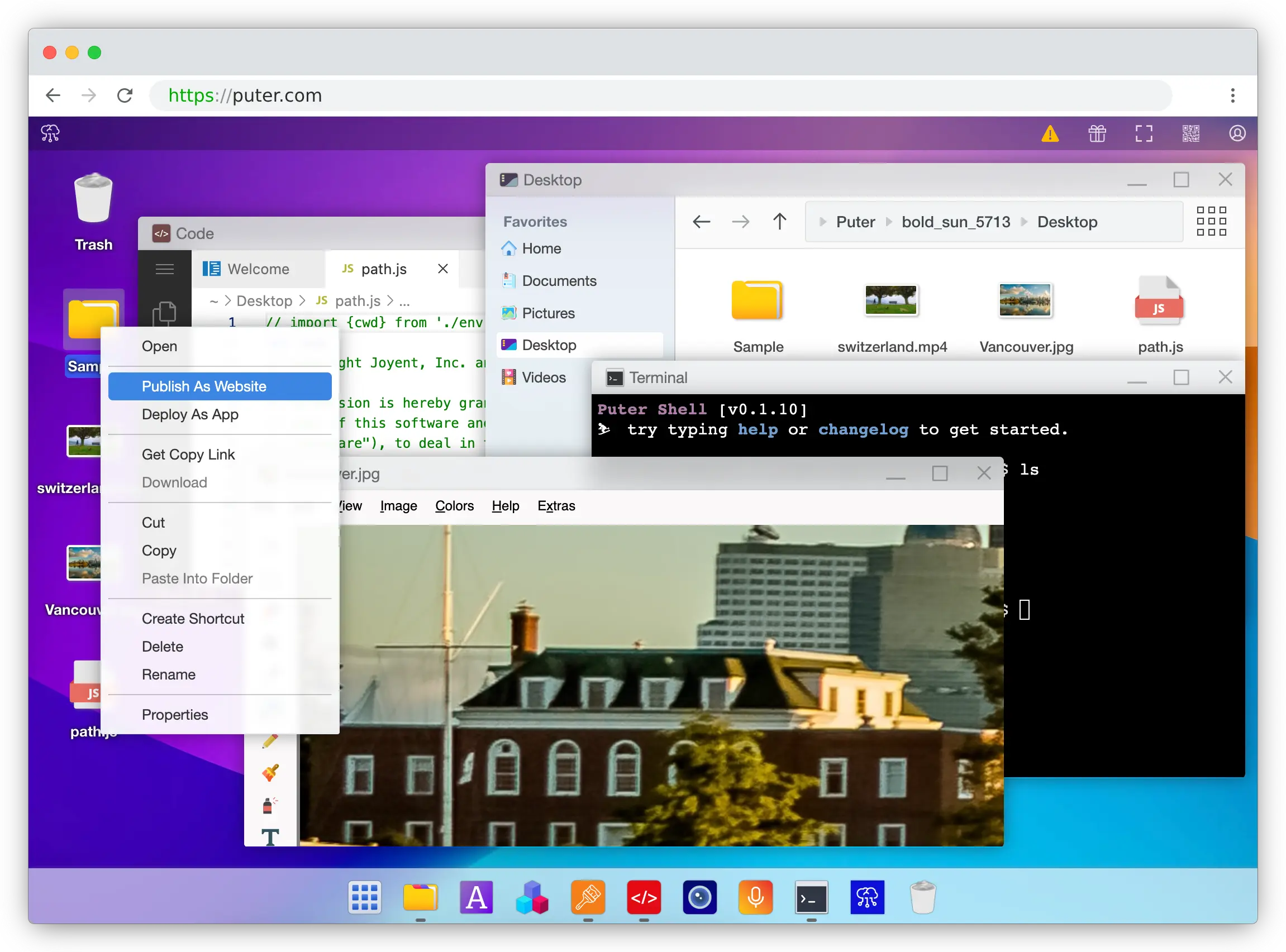
The Internet OS! Free, Open-Source, and Self-Hostable.
« LIVE DEMO »
Puter.com
·
App Store
·
Developers
·
CLI
·
Discord
·
Reddit
·
X
Puter
Puter is an advanced, open-source internet operating system designed to be feature-rich, fast, and highly extensible. Puter can be used as:
- A privacy-first personal cloud to keep all your files, apps, and games in one secure place, accessible from anywhere at any time.
- A platform for building and publishing websites, web apps, and games.
- An alternative to Dropbox, Google Drive, OneDrive, etc. with a fresh interface and powerful features.
- A remote desktop environment for servers and workstations.
- A friendly, open-source project and community to learn about web development, cloud computing, distributed systems, and much more!
Getting Started
to install npm and node
💻 Local Development
git clone https://github.com/HeyPuter/puter
cd puter
npm install
npm start
→ This should launch Puter at http://puter.localhost:4100 (or the next available port).
If this does not work, see First Run Issues for troubleshooting steps.
🐳 Docker
mkdir puter && cd puter && mkdir -p puter/config puter/data && sudo chown -R 1000:1000 puter && docker run --rm -p 4100:4100 -v `pwd`/puter/config:/etc/puter -v `pwd`/puter/data:/var/puter ghcr.io/heyputer/puter
→ This should launch Puter at http://puter.localhost:4100 (or the next available port).
🐙 Docker Compose
Linux/macOS
mkdir -p puter/config puter/data
sudo chown -R 1000:1000 puter
wget https://raw.githubusercontent.com/HeyPuter/puter/main/docker-compose.yml
docker compose up
→ This should be available at http://puter.localhost:4100 (or the next available port).
Windows
mkdir -p puter
cd puter
New-Item -Path "puter\config" -ItemType Directory -Force
New-Item -Path "puter\data" -ItemType Directory -Force
Invoke-WebRequest -Uri "https://raw.githubusercontent.com/HeyPuter/puter/main/docker-compose.yml" -OutFile "docker-compose.yml"
docker compose up
→ This should launch Puter at http://puter.localhost:4100 (or the next available port).
🚀 Self-Hosting
For detailed guides on self-hosting Puter, including configuration options and best practices, see our Self-Hosting Documentation.
☁️ Puter.com
Puter is available as a hosted service at puter.com.
System Requirements
- Operating Systems: Linux, macOS, Windows
- RAM: 2GB minimum (4GB recommended)
- Disk Space: 1GB free space
- Node.js: Version 24+
- npm: Latest stable version
Support
Connect with the maintainers and community through these channels:
- Bug report or feature request? Please open an issue.
- Discord: discord.com/invite/PQcx7Teh8u
- X (Twitter): x.com/HeyPuter
- Reddit: reddit.com/r/puter/
- Mastodon: mastodon.social/@puter
- Security issues? security@puter.com
- Email maintainers at hi@puter.com
We are always happy to help you with any questions you may have. Don't hesitate to ask!
License
This repository, including all its contents, sub-projects, modules, and components, is licensed under AGPL-3.0 unless explicitly stated otherwise. Third-party libraries included in this repository may be subject to their own licenses.
Translations
- Arabic / العربية
- Armenian / Հայերեն
- Bengali / বাংলা
- Chinese / 中文
- Danish / Dansk
- English
- Farsi / فارسی
- Finnish / Suomi
- French / Français
- German / Deutsch
- Hebrew/ עברית
- Hindi / हिंदी
- Hungarian / Magyar
- Indonesian / Bahasa Indonesia
- Italian / Italiano
- Japanese / 日本語
- Korean / 한국어
- Malay / Bahasa Malaysia
- Malayalam / മലയാളം
- Polish / Polski
- Portuguese / Português
- Punjabi / ਪੰਜਾਬੀ
- Romanian / Română
- Russian / Русский
- Spanish / Español
- Swedish / Svenska
- Tamil / தமிழ்
- Telugu / తెలుగు
- Thai / ไทย
- Turkish / Türkçe
- Ukrainian / Українська
- Urdu / اردو
- Vietnamese / Tiếng Việt