 Guarzo
4c9935ad7e
Guarzo
4c9935ad7e
The dev container did not come up cleanly. This fixes the correctness
problems and fills in the missing developer ergonomics.

Correctness fixes:

* Erlang/OTP: base image was elixir:1.17-otp-27, but .tool-versions
  pins erlang 26.2.5.5 / elixir 1.17.3-otp-26. Switched to
  elixir:1.17-otp-26 so container builds match CI and local asdf.
* Postgres: bumped 13-alpine -> 16-alpine. AshPostgres declares
  min_pg_version 15 in lib/wanderer_app/repo.ex, so 13 was below the
  supported floor; 16 also matches production. The data volume is
  renamed db-new -> db-pg16 because a PG13 data directory is not
  readable by a PG16 server, so reusing the name would fail to start
  rather than upgrade.
* host.docker.internal: replaced the common-utils feature's
  networkArgs (which only applies at feature install time) with a
  plain compose extra_hosts entry.
* Dropped `apt --fix-broken install` and the duplicated
  jakebecker.elixir-ls extension id.
* setup.sh: the assets block was indented as if inside the ecto
  conditional and never ran `yarn build`. Fixed and added an explicit
  build step.
* setup.sh: chown deps/ and _build/ to the container user; they come
  from the bind mount and carry host ownership.

Non-root user:

Added a `developer` user (uid/gid 1000, passwordless sudo) instead of
running as root, so files created in the bind-mounted workspace are
owned by the host user rather than root.

Build artifacts:

Removed the elixir-artifacts named volume. A named volume mounted
inside the bind mount masks the repo's own deps/ and _build/, and only
for the main working tree — git worktrees came up empty and recompiled
from scratch. Host and container now share _build; after changing the
OTP version, `rm -rf _build` once.

Database seeding:

setup.sh now runs priv/repo/seeds.exs only when the SDE reference data
is missing, checked with `mix run --no-start` so the check does not
boot the supervision tree and its outbound pollers.

Developer experience:

* zsh + oh-my-zsh with autosuggestions/syntax highlighting, persistent
  shell history in a named volume, and mix/git aliases.
* gh CLI, ripgrep, tree, htop, lsof, git-lfs, inotify-tools.
* en_US.UTF-8 locale generated.
* post-start.sh prints environment info and checks Postgres.
* More VS Code extensions (Phoenix, Credo, GitLens, dotenv, Docker)
  and _build/deps excluded from search.
* docker-compose.override.yml.example for host-specific mounts (SSH
  keys, gh auth). The override is gitignored and auto-created empty by
  initializeCommand, so it is optional.
* .devcontainer/ added to .dockerignore so it does not invalidate
  production image build cache.
Wanderer
Wanderer is an #1 EVE Online mapper tool, light and fast alternative to Pathfinder. You can self-host Wanderer Community Edition or have us manage Wanderer for you in the cloud. Made and hosted in the EU 🇪🇺
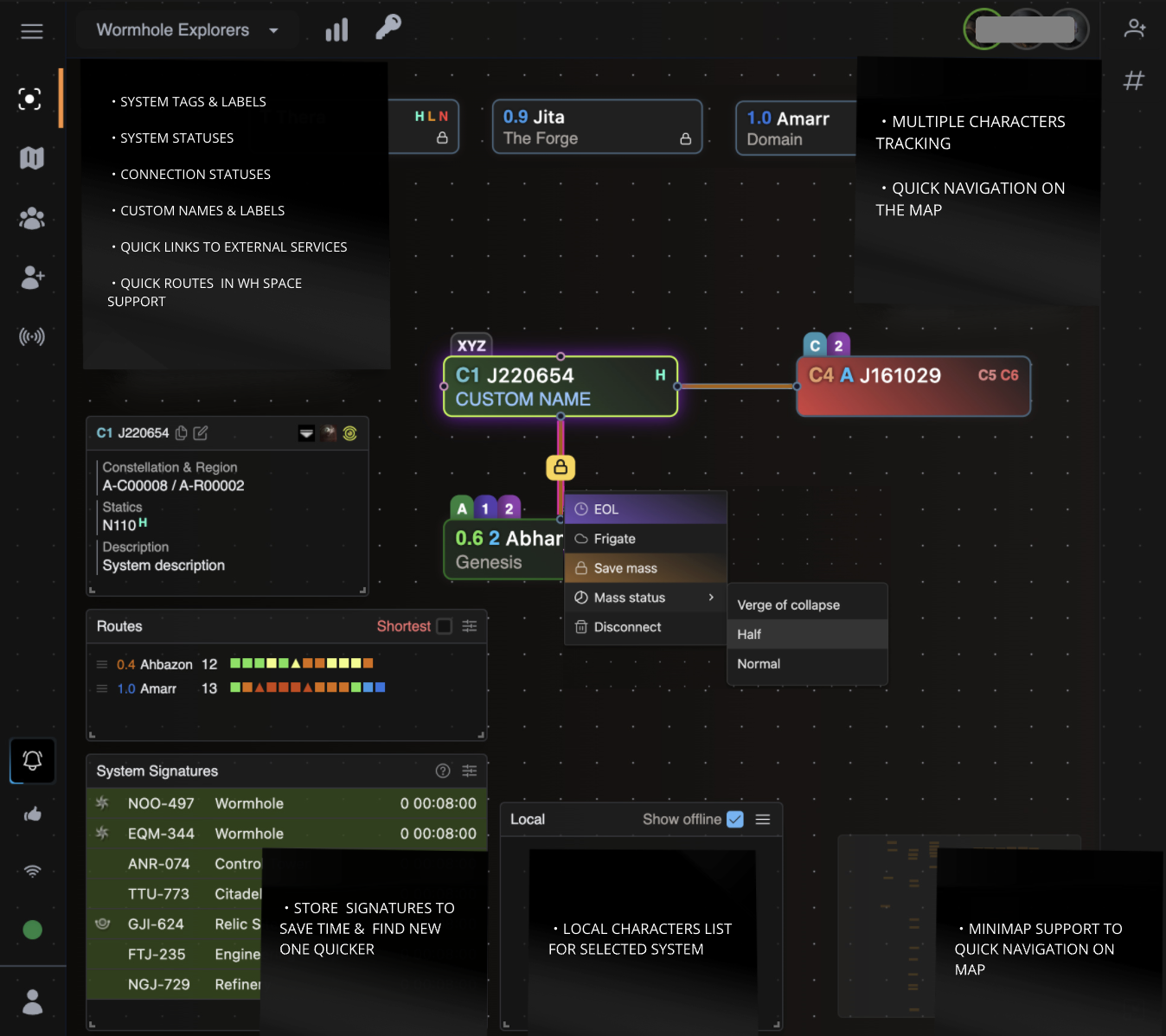
Why Wanderer?
Here's what makes Wanderer a great Pathfinder alternative:
- Clutter Free: Wanderer provides simple interface and it cuts through the noise. No training necessary.
- Lightweight, fast and secure: Wanderer is lightweight and fast. It uses a self-hosted database and a self-hosted server.
- See all your characaters on a single page: Wanderer provides a simple interface to see all your characters on a single page.
- SPA support: Wanderer is built with modern web frameworks in core.
- Active development: Wanderer is actively developed and improved with new features and updates every week based on user feedback.
Interested to learn more? Check more on our website.
Can Wanderer be self-hosted?
Wanderer is open source project and we have a free as in beer and self-hosted solution called Wanderer Community Edition (CE). Here are the differences between Wanderer and Wanderer CE:
| Wanderer Cloud | Wanderer Community Edition | |
|---|---|---|
| Infrastructure management | Easy and convenient. It takes 2 minutes to register your character and create a map. We manage everything so you don’t have to worry about anything and can focus on gameplay. | You do it all yourself. You need to get a server and you need to manage your infrastructure. You are responsible for installation, maintenance, upgrades, server capacity, uptime, backup, security, stability, consistency, loading time and so on. |
| Release schedule | Continuously developed and improved with new features and updates multiple times per week. | Latest features and improvements won't be immediately available. |
| Server location | All visitor data is exclusively processed on EU-owned cloud infrastructure. We keep your site data on a secure, encrypted and green energy powered server in Germany. This ensures that your site data is protected by the strict European Union data privacy laws and ensures compliance with GDPR. Your website data never leaves the EU. | You have full control and can host your instance on any server in any country that you wish. Host it on a server in your basement or host it with any cloud provider wherever you want, even those that are not GDPR compliant. |
Interested in self-hosting Wanderer CE on your server? Take a look at our Wanderer CE installation instructions.
Wanderer CE is a community supported project and there are no guarantees that you will get support from the creators of Wanderer to troubleshoot your self-hosting issues. There is a community supported forum where you can ask for help.
Our only source of funding is your donations.
Technology
Wanderer is a standard Elixir/Phoenix application backed by a PostgreSQL database for general data. On the frontend we use TailwindCSS for styling and React to make the map interactive.
Development
Setup
-
Copy
.env.exampleto.envand fill in the values -
Run
mix setupto install and setup dependencies -
(optional step) run
make yarnto install client dependencies
Run
- Start server with
make serverormake s
Now you can visit localhost:8000 from your browser.
Using .devcontainer
-
Run devcontainer
-
Install additional dependencies inside Dev container
-
root@0d0a785313b6:/app# apt update -
root@0d0a785313b6:/app# curl -sL https://deb.nodesource.com/setup_18.x | bash - -
root@0d0a785313b6:/app# apt-get install nodejs inotify-tools -y -
root@0d0a785313b6:/app# npm install -g yarn -
root@0d0a785313b6:/app# mix setup -
See how to run server in #Run section
Using nix flakes
- Run
nix develop - Run local postgres server:
pg-setup&pg-start - See how to start server in #setup section
Migrations
Reset database
mix ecto.reset
Run seed data
mix run priv/repo/seeds.exs
Generate new migration
mix ash.codegen <name_of_migration>mix ash.migrate
Generate cloak key
iex> 32 |> :crypto.strong_rand_bytes() |> Base.encode64()